
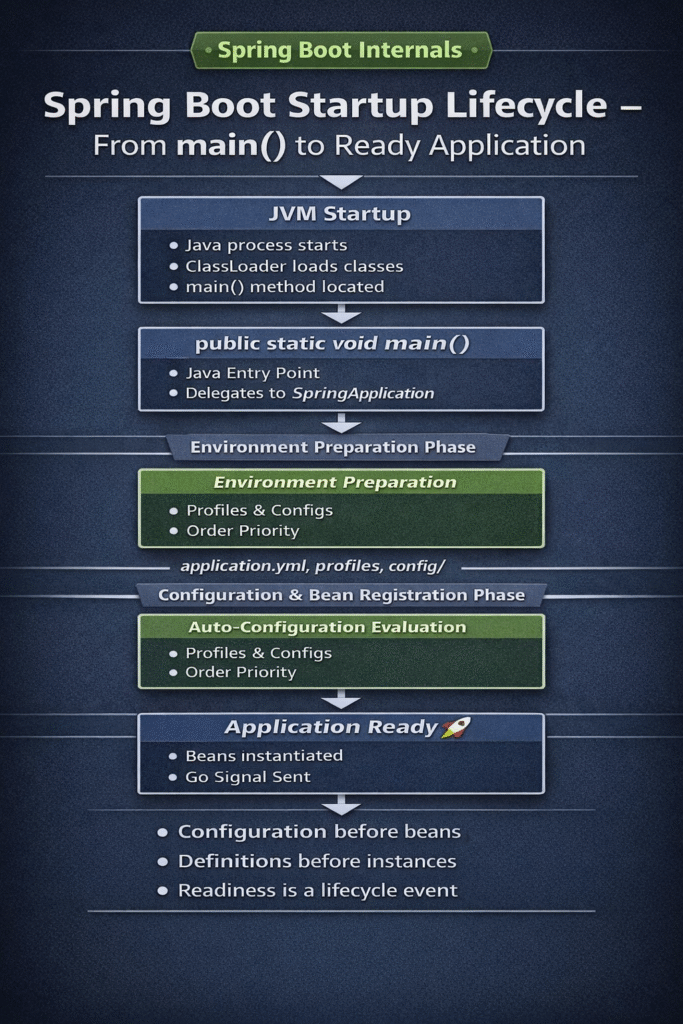
Spring Boot is one of the most widely used frameworks in modern Java backend systems. Most developers use it daily, yet very few truly understand what actually happens when a Spring Boot application starts.
This article explains the Spring Boot Startup Lifecycle in detail, from the JVM invoking main() to a fully ready application.
In real production systems, this understanding is not optional.
Knowing the Spring Boot startup lifecycle is essential for:
- Debugging startup failures
- Diagnosing slow boot times
- Controlling initialization order
- Writing predictable startup logic
- Answering Spring internals interview questions with confidence
This article provides a deep, internals-focused walkthrough of the Spring Boot startup lifecycle — from the JVM invoking main() to the moment the application is fully initialized and ready to serve traffic.
This is a continuation of the Code & Candles Spring Internals series. If you have not read the architectural foundation yet, start here:
👉 https://codeandcandles.com/spring-boot-and-spring-framework-internals
What Spring Boot Really Does During Startup
Spring Boot does not invent a new lifecycle.
Instead, it orchestrates the Spring Framework startup process using conventions, sensible defaults, and auto-configuration.
The result is a predictable, extensible, production-safe startup sequence.
High-Level Spring Boot Startup Lifecycle Flow
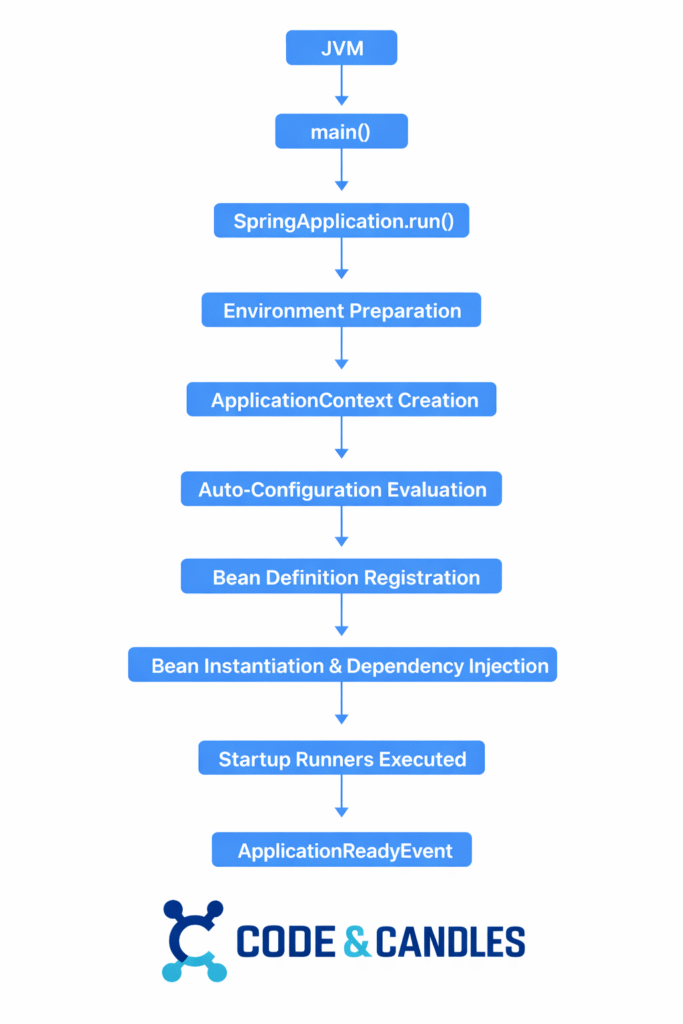
Each phase has a clear responsibility and strict ordering.
1. main() Method and SpringApplication.run()
Every Spring Boot application starts with a standard Java entry point:
@SpringBootApplication
public class Application {

    public static void main(String[] args) {
        SpringApplication.run(Application.class, args);
    }
}
The main() method itself is trivial.
The real work happens inside SpringApplication.run().
Internally, Spring Boot:
- Determines application type (Servlet, Reactive, or Non-Web)
- Loads
SpringApplicationRunListenerimplementations - Prepares the runtime
Environment - Creates the appropriate
ApplicationContext - Triggers the Spring Framework lifecycle
This method is the single orchestration boundary for the entire framework.
2. Environment Preparation (Before Any Beans Exist)
Before Spring creates a single bean, it builds the Environment.
The Environment answers questions like:
- Which profiles are active?
- Which configuration files should be loaded?
- Which property wins if defined in multiple places?
- Should conditional beans load?
This stage exists so that configuration is finalized before object creation.
Why this matters
If configuration were loaded after beans were created:
@Valueresolution would be inconsistent@ConfigurationPropertiesbinding could fail- Auto-configuration conditions would evaluate incorrectly
- Production behavior would be unpredictable
Spring Boot enforces determinism by preparing the environment first.
2.1 How application.yml Works Across Environments
Real systems run the same codebase across:
- local
- dev
- qa
- stage
- prod
Spring Boot supports this using profiles and profile-specific configuration files.
Typical layout:
src/main/resources/
  application.yml
  application-local.yml
  application-dev.yml
  application-qa.yml
  application-stage.yml
  application-prod.yml
How merging works
When profile qa is active:
application.ymlloads first (baseline)application-qa.ymlloads next (override)
Profile-specific values override baseline values.
Example
Baseline (application.yml)
spring:
  application:
    name: tradepulse-api
  datasource:
    hikari:
      maximum-pool-size: 10

feature:
  newCheckoutFlow: false
QA override (application-qa.yml)
spring:
  datasource:
    url: jdbc:postgresql://qa-db.internal:5432/tradepulse
    username: tradepulse_qa
    password: ${DB_PASSWORD}

feature:
  newCheckoutFlow: true
2.2 How Profiles Are Activated
Common activation methods:
Command line
java -jar app.jar --spring.profiles.active=localEnvironment variable
export SPRING_PROFILES_ACTIVE=prodMaven
mvn spring-boot:run -Dspring-boot.run.profiles=local2.3 Why Spring Boot Looks for a config/ Folder by Default
This behavior is intentional.
Spring Boot enforces a core principle:
Code and configuration must be separated.
The config/ folder exists to support:
- Immutable artifacts
- Environment-specific overrides
- Safe operations without rebuilds
Spring Boot automatically checks for external configuration in a config/ directory before using packaged resources.
Canonical production layout
/opt/tradepulse/
├── app.jar
└── config/
    ├── application.yml
    └── application-prod.yml
Run:
java -jar /opt/tradepulse/app.jarSpring Boot:
- Detects
/config - Loads external config
- Overrides packaged defaults
- Applies profiles
No flags. No code changes.
2.4 How to Externalize Environment Configuration
Externalizing config means moving environment-specific values out of the JAR.
Strategy 1: External YAML files (most common)
- Defaults in
src/main/resources/application.yml - Overrides in
/config/application-prod.yml
Strategy 2: Environment variables (preferred for secrets)
export SPRING_DATASOURCE_URL=jdbc:postgresql://prod-db:5432/app
export SPRING_DATASOURCE_PASSWORD=secret
Spring Boot maps:
SPRING_DATASOURCE_URL → spring.datasource.urlStrategy 3: Kubernetes ConfigMaps & Secrets
- ConfigMaps → non-sensitive config
- Secrets → credentials
- Mounted to
/configor injected as env vars
Strategy 4: Secret managers
- Vault
- AWS SSM / Secrets Manager
- Azure Key Vault
The application never owns secrets — the platform does.
2.5 Maven (pom.xml) and Packaging Considerations
By default:
src/main/resources→ packaged inside the JAR
Recommended pattern:
- Package safe defaults only
- Externalize environment-specific config
- Avoid rebuilding artifacts per environment
This enables:
- One artifact for all environments
- Faster incident response
- Lower deployment risk
3. ApplicationContext Creation
Based on application type, Spring Boot creates:
| Type | ApplicationContext |
|---|---|
| Servlet | AnnotationConfigServletWebServerApplicationContext |
| Reactive | AnnotationConfigReactiveWebServerApplicationContext |
| Non-Web | AnnotationConfigApplicationContext |
At this stage:
- The container exists
- No application beans are instantiated
- Bean definitions are about to be loaded
4. Auto-Configuration Discovery and Evaluation
Spring Boot discovers auto-configuration candidates from:
META-INF/spring.factoriesMETA-INF/spring/org.springframework.boot.autoconfigure.AutoConfiguration.imports
Each configuration is guarded by conditions:
@ConditionalOnClass@ConditionalOnMissingBean@ConditionalOnProperty@ConditionalOnWebApplication
Only matching configurations apply.
Auto-configuration is conditional and override-friendly, not magical.
5. Bean Definition Registration
Spring registers bean definitions from:
- Component scanning (
@Component,@Service, etc.) @Beanmethods- Framework infrastructure
At this point:
- Bean definitions exist
- No instances yet
6. Bean Instantiation and Dependency Injection
Spring now creates beans and resolves dependencies:
- Constructor injection
- Setter injection
- Proxy creation (AOP, transactions)
BeanPostProcessorexecution
Singleton beans are eagerly created unless marked @Lazy.
Interview Insight
Why should heavy logic never run in constructors?
Because constructors execute during context initialization and can:
- Block startup
- Break dependency resolution
- Fail before the system is stable
7. Startup Hooks (ApplicationRunner, CommandLineRunner)
After initialization, Spring Boot invokes runners:
@Component
public class StartupVerifier implements ApplicationRunner {
    public void run(ApplicationArguments args) {
        System.out.println("Application started");
    }
}
Use for:
- Validation
- Cache warm-up
- Lightweight initialization
Avoid long-running or blocking work.
8. ApplicationReadyEvent
Spring Boot publishes ApplicationReadyEvent last.
At this point:
- Context is fully initialized
- Embedded server is running
- Startup hooks are complete
- Application is ready for traffic
Only ApplicationReadyEvent guarantees full readiness.
Configuration Precedence Order (Exact)
High → Low:
- Command-line arguments
- Java system properties
- Environment variables
- External config (
/config) - Working directory config
- Classpath config (inside JAR)
- Code defaults
Debugging Guide: “Why Is My Config Not Taking Effect?”
- Confirm active profiles
- Check command-line overrides
- Inspect environment variables
- Verify external
config/folder - Validate file names and YAML syntax
- Enable config debug logging if needed
logging:
  level:
    org.springframework.boot.context.config: DEBUG
Why This Lifecycle Matters in Production
Most startup bugs are lifecycle mistakes, not framework bugs.
Understanding this flow helps you:
- Diagnose slow startup
- Avoid premature bean access
- Control initialization order
- Reason about auto-configuration
For performance implications, see:
https://codeandcandles.com/rest-api-performance-optimization/
TL;DR — Spring Boot Startup Lifecycle
Spring Boot startup is a deterministic, multi-phase lifecycle, not a black box.
In order:
- JVM starts and invokes
main() SpringApplication.run()orchestrates startup- Environment is prepared first
(profiles, config files, env vars, precedence) - ApplicationContext is created (Servlet / Reactive / Non-Web)
- Auto-configuration is evaluated using conditions
- Bean definitions are registered (no instances yet)
- Beans are instantiated and wired
- Startup runners execute
ApplicationReadyEventsignals readiness
Key rules:
- Configuration is resolved before beans
- Definitions exist before instances
- Readiness is a lifecycle event, not context refresh
If you remember this flow, most Spring Boot “mysteries” disappear.
View the complete Spring Boot configuration demo on GitHub
Key Takeaways for Backend Engineers
- Spring Boot startup is layered and ordered by design
- Most startup bugs are lifecycle placement mistakes
- Configuration issues are almost always precedence issues
- Externalized config and profiles are production safety features
- Understanding startup internals dramatically improves:
- Debugging speed
- Interview performance
- System reliability
This knowledge separates framework users from framework engineers.
Conclusion
Spring Boot startup is not magic.
It is a carefully engineered orchestration of:
- JVM mechanics
- Spring Framework lifecycles
- Configuration precedence
- Conditional auto-configuration
- Bean creation rules
- Explicit readiness signaling
Once you understand this lifecycle, Spring Boot becomes:
- Predictable
- Debuggable
- Production-safe
- Interview-friendly
This is exactly how a modern backend framework should behave.
Mastering the Spring Boot Startup Lifecycle makes Spring Boot predictable, debuggable, and production-safe.
Why does Spring Boot prepare the Environment before creating beans?
Because:
Conditional auto-configuration depends on properties@ConfigurationProperties binding must be deterministic
Bean registration decisions require finalized config
What is the difference between ContextRefreshedEvent and ApplicationReadyEvent?
ContextRefreshedEvent: container refreshedApplicationReadyEvent: container + runners + server fully ready
Only ApplicationReadyEvent is safe for readiness signals.
Why should heavy logic never run in bean constructors?
Because constructors execute:
During context initialization
Before the system is stable
Before all dependencies may be ready
Heavy work here causes slow startup and fragile systems.
Related Code & Candles Deep Dives
- Spring Internals
https://codeandcandles.com/spring-boot-and-spring-framework-internals/ - Java Concurrency
https://codeandcandles.com/java-concurrency-interview-questions/
https://codeandcandles.com/executorservice-thread-pools-java-guide/ - Streams & Lambdas
https://codeandcandles.com/java-streams-api-explained/
https://codeandcandles.com/java-8-lambda-expressions-guide/
References
- Spring Boot Reference Documentation — Externalized Configuration & Profiles
- Spring Boot Reference Documentation — Auto-Configuration
- Spring Boot Reference Documentation — SpringApplication Startup & Application Events
- Spring Framework Reference Documentation — The IoC Container (BeanFactory/ApplicationContext)
- Spring Framework Reference Documentation — Bean Lifecycle & Extension Points
- Spring Framework Reference Documentation — Environment Abstraction (PropertySources, Profiles)
- Spring Boot Source Code — org.springframework.boot.SpringApplication
- Spring Boot Source Code — org.springframework.boot.context.config (Config Data Loading)
- Spring Boot Source Code — org.springframework.boot.autoconfigure (AutoConfiguration Imports)
- Spring Boot Source Code — org.springframework.boot.context.event (Startup Events)
- Spring Boot Actuator — Application Startup Metrics & Health/Readiness Probes
- Spring Boot Maven Plugin Documentation — Packaging & Executable JAR Layout
Did this tutorial help you?
If you found this useful, consider bookmarking Code & Candles or sharing it with a friend.
Explore more tutorials