
Learn how Java handles concurrency using Threads, Runnable, and Callable, and build a strong foundation for backend interviews.
🔹 What is Concurrency?
Concurrency in Java refers to the ability of an application to execute multiple tasks at the same time (or appear to). It improves:
- Performance – uses multiple CPU cores
- Responsiveness – UI or main thread stays free
- Scalability – handles more users / operations
🔹 Concurrency vs Parallelism
Many people confuse the two:
| Concept | Meaning | Example |
|---|---|---|
| Concurrency | Multiple tasks making progress at the same time | Switching between tasks |
| Parallelism | Multiple tasks executing at the same exact time | Using multiple CPU cores |
Java supports both, but concurrency is the broader concept.
🧠 Visualizing How Threads Work in Java
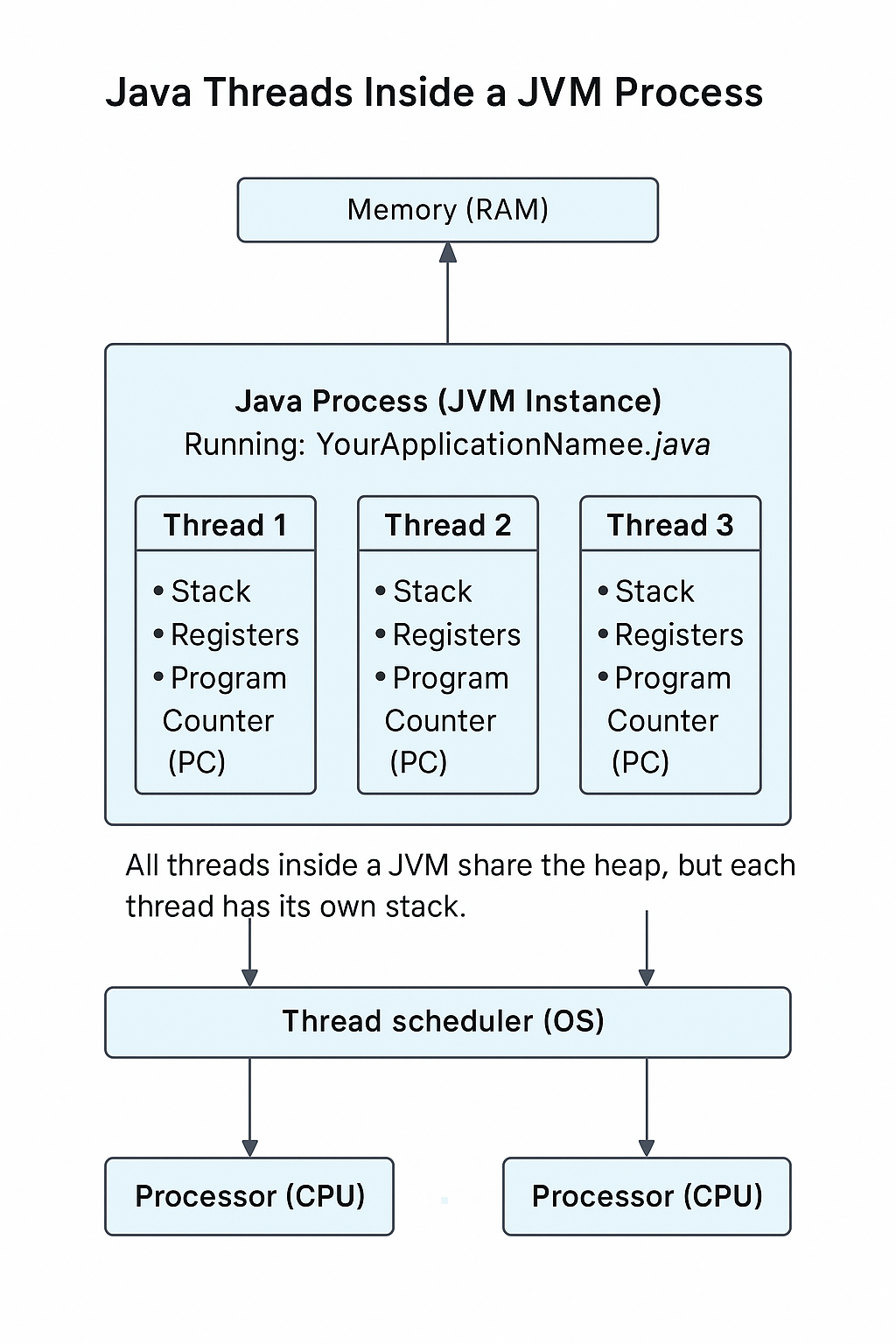
Before we learn Runnable, Thread, and Callable, it helps to understand how Java actually runs your program inside the JVM.
When you execute a Java application:
- The JVM creates a process
- Inside that process, Java starts multiple threads — at minimum:
- Main thread
- GC thread
- Compiler threads
- Other system threads
- Each thread has:
- Its own stack
- Its own registers
- Its own program counter (PC)
- All threads share the same heap memory
- The Operating System’s Thread Scheduler assigns these threads to available CPU cores.
This diagram helps you visualize how Java threads live inside the JVM and how they interact with memory, the OS, and CPU cores:
🟦 Thread Life Cycle
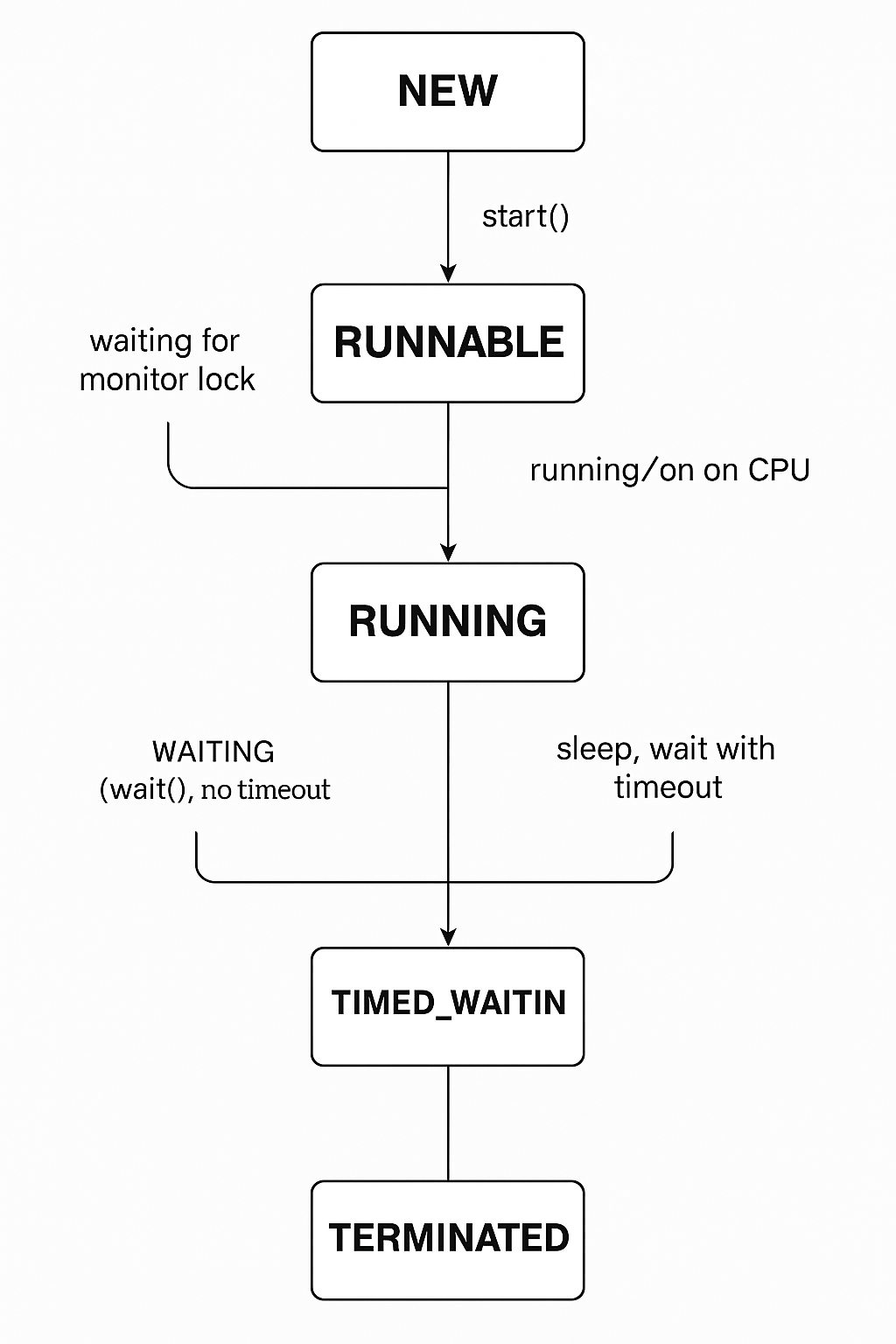
A Java thread goes through several stages in its lifetime.
Understanding these states helps you know how scheduling, waiting, blocking, and termination actually work under the hood.
When you call start() on a thread, the JVM and OS kernel take over. The thread may switch between several states depending on conditions like:
- CPU availability
- Locks (synchronized blocks)
- Sleep or wait calls
- IO operations
- Completion of the
run()method
The diagram below shows every possible state and how a thread transitions between them.
🟦 What Each State Means (Short, Clean Explanation)
1️⃣ NEW
Thread object created but start() not called yet.
The thread does not yet exist in the OS scheduler.
2️⃣ RUNNABLE
The thread is ready to run but may or may not be currently executing.
JVM hands it to the OS scheduler.
Important:
➡ A thread in RUNNABLE may be actively running OR waiting for CPU — JVM combines both states.
3️⃣ RUNNING
(Not an official Java enum state, but happens internally)
When the OS gives the thread a CPU core, it becomes RUNNING temporarily.
4️⃣ BLOCKED
Thread is waiting for a monitor lock (synchronized block).
Example:
synchronized(this) {
   // another thread owns this lock
}
5️⃣ WAITING
Thread waits indefinitely until another thread signals it.
Examples:
wait();     // waits until notified
join();     // waiting for another thread to finish
6️⃣ TIMED_WAITING
Thread waits for a specified time.
Examples:
sleep(1000);
wait(500);
join(2000);
7️⃣ TERMINATED
Thread has finished running because:
✔ run() completed
✔ uncaught exception occurred
It cannot be restarted.
🔹 Java Concurrency Basics
Java provides three primary ways to create and execute concurrent tasks:
- Implementing
Runnable - Extending
Thread - Using
CallablewithExecutorService(modern approach)
1️⃣ Implementing Runnable (Recommended Basic Approach)
Runnable represents a task without return value.
public class MyRunnable implements Runnable {
    @Override
    public void run() {
        System.out.println("Runnable thread running...");
    }
}

public class Main {
    public static void main(String[] args) {
        Thread thread = new Thread(new MyRunnable());
        thread.start();
    }
}
Pros:
- Lightweight
- Reusable
- Does not block inheritance
2️⃣ Extending the Thread Class
This approach is easy but less flexible.
class MyThread extends Thread {
    @Override
    public void run() {
        System.out.println("Thread subclass running...");
    }
}

public class Main {
    public static void main(String[] args) {
        new MyThread().start();
    }
}
Con:
- Your class is now tied to
Thread, so you lose single inheritance flexibility.
3️⃣ Using Callable + Future + ExecutorService (Modern Approach)
Callable<V> can:
- ✅ Return a value
- ✅ Throw checked exceptions
- ✅ Run inside a thread pool using
ExecutorService
Example: Factorial Calculation
import java.util.concurrent.Callable;
import java.util.concurrent.TimeUnit;

class FactorialTask implements Callable<Long> {
    private final int number;

    public FactorialTask(int number) {
        this.number = number;
    }

    @Override
    public Long call() throws Exception {
        long result = 1;

        if (number < 0) {
            throw new IllegalArgumentException("Number must be non-negative.");
        }

        for (int i = 2; i <= number; i++) {
            result *= i;
            TimeUnit.MILLISECONDS.sleep(100); // simulate work
        }

        return result;
    }
}
Executing with ExecutorService
import java.util.concurrent.*;

public class CallableExecutionExample {
    public static void main(String[] args) {

        ExecutorService executor = Executors.newFixedThreadPool(2);

        FactorialTask task = new FactorialTask(5);
        Future<Long> resultFuture = executor.submit(task);

        System.out.println("Main thread is doing other work...");

        try {
            Long result = resultFuture.get();
            System.out.println("Factorial of 5 is: " + result);

        } catch (InterruptedException e) {
            Thread.currentThread().interrupt();

        } catch (ExecutionException e) {
            System.err.println("Task failed: " + e.getCause().getMessage());

        } finally {
            executor.shutdown();
        }
    }
}
🔹 Summary Table
| Method | Returns Value? | Can Throw Exception? | Best Use Case |
|---|---|---|---|
| Runnable | ❌ No | ❌ No | Simple fire-and-forget |
| Thread | ❌ No | ❌ No | Learning / demos only |
| Callable | ✅ Yes | ✅ Yes | Real-world concurrent code |
🔹 Recommended Next Topic
A natural next step after this tutorial is:
ExecutorService & Thread Pools in Java
(fixed thread pools, cached pools, scheduled executors, Futures, etc.)
⭐ Special Interview Questions & Answers (Quick Reference)
(Section 1 – include in this tutorial)
These are short, high-value Q&A items you can use to prepare for real Java backend interviews.
1️⃣ What is the difference between concurrency and parallelism?
Answer:
Concurrency means multiple tasks making progress at the same time.
Parallelism means tasks running at exactly the same time on multiple CPU cores.
2️⃣ Why is Callable preferred over Runnable?
Answer:
Because Callable can:
✔ return a value
✔ throw checked exceptions
✔ work naturally with thread pools (ExecutorService)
3️⃣ What happens if you call run() instead of start()?
Answer:run() executes on the current thread → no new thread created.start() creates a new thread and executes run() inside it.
4️⃣ Why should we avoid creating threads manually (new Thread())?
Answer:
It does not scale.
Thread pools reuse threads, reduce overhead, optimize CPU scheduling, and improve performance under load.
5️⃣ What is a blocking vs non-blocking operation?
Answer:
A blocking operation pauses the thread until it completes (e.g., Thread.sleep, I/O).
Non-blocking operations allow the thread to continue without waiting.
6️⃣ What is thread starvation?
Answer:
A condition where a thread never gets CPU time because other high-priority threads dominate the scheduler.
7️⃣ What is the difference between a process and a thread?
Answer:
A process has its own memory space.
Threads inside the same process share memory but have independent execution paths.
🔗 Full Interview Questions (Advanced) — Coming Soon
“Java Concurrency — Real Interview Questions (20+ Essential Q&As)”
A complete, in-depth interview guide will be published soon.
This article will include real-world scenarios, tricky concurrency pitfalls, and senior-level explanations.
Ready to practice? Check out the companion article:
Did this tutorial help you?
If you found this useful, consider bookmarking Code & Candles or sharing it with a friend.
Explore more tutorials