
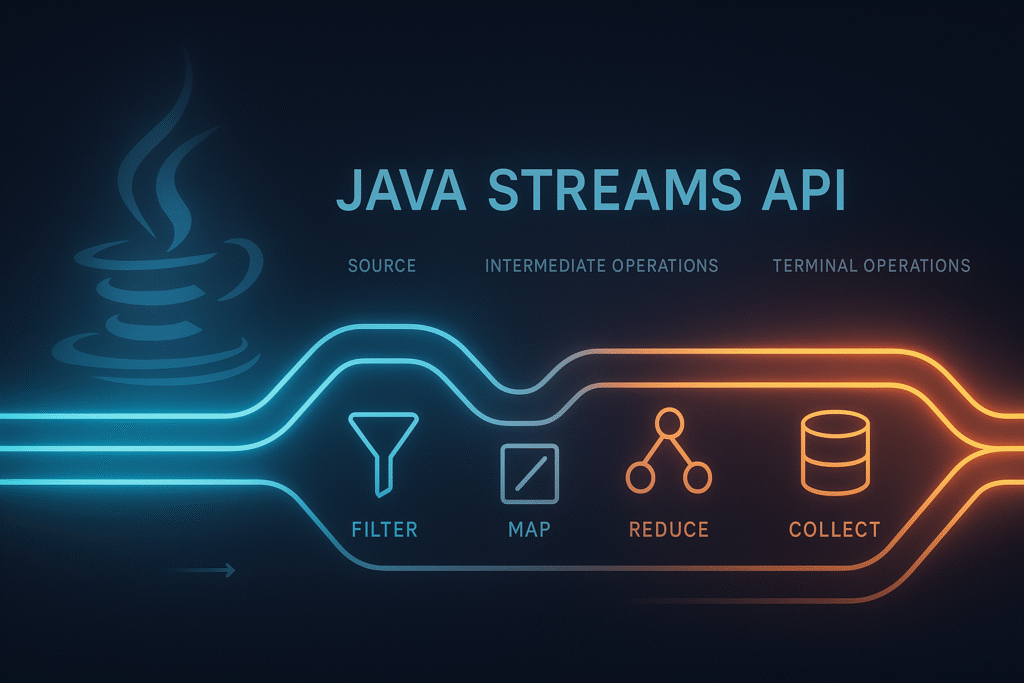
The Streams API is one of the most powerful features introduced in Java 8. It brings functional-style data processing to Java, allowing you to write cleaner, more expressive, and more maintainable code. With Streams, you can filter, transform, and process data using a fluent, declarative style that removes the need for loops, temporary variables, and manual state management.
Whether you’re preparing for interviews or upgrading your backend skills, understanding Streams is essential for modern Java development.
1. Introduction
The Java Streams API enables you to perform complex data processing in a functional, pipeline-oriented way. Instead of writing loops, mutating variables, or managing indices manually, Streams allow you to process collections elegantly and safely.
✔ Why Streams matter
- Cleaner, more expressive code
- Reduced boilerplate
- Encourages functional programming
- Supports lazy evaluation for performance
- Enables powerful transformations and aggregations
- Helps avoid bugs related to mutable state
Streams work beautifully with lambda expressions and method references, making them a natural extension of Java 8’s functional features.
2. What Exactly Is a Stream?
A Stream is a sequence of elements that supports functional-style operations. A Java Stream is a lazily evaluated, immutable sequence of elements supporting functional-style operations.
It is important to understand what a Stream is not:
✔ A Stream is not a data structure
It does not store elements internally.
✔ A Stream is not reusable
After a terminal operation runs, the stream is consumed forever.
✔ A Stream is not a replacement for a collection
It is a tool to process data from a collection.
✔ A Stream is a pipeline
It describes a series of operations to perform on a data source.
🔹 Example: Traditional Loop vs Stream Pipeline
Without Streams:
List<String> result = new ArrayList<>();
for (String name : names) {
    if (name.startsWith("A")) {
        result.add(name.toUpperCase());
    }
}
With Streams:
List<String> result =
    names.stream()
         .filter(n -> n.startsWith("A"))
         .map(String::toUpperCase)
         .toList();
The Stream-based code is shorter, cleaner, and easier to read.
3. Stream Pipeline Architecture
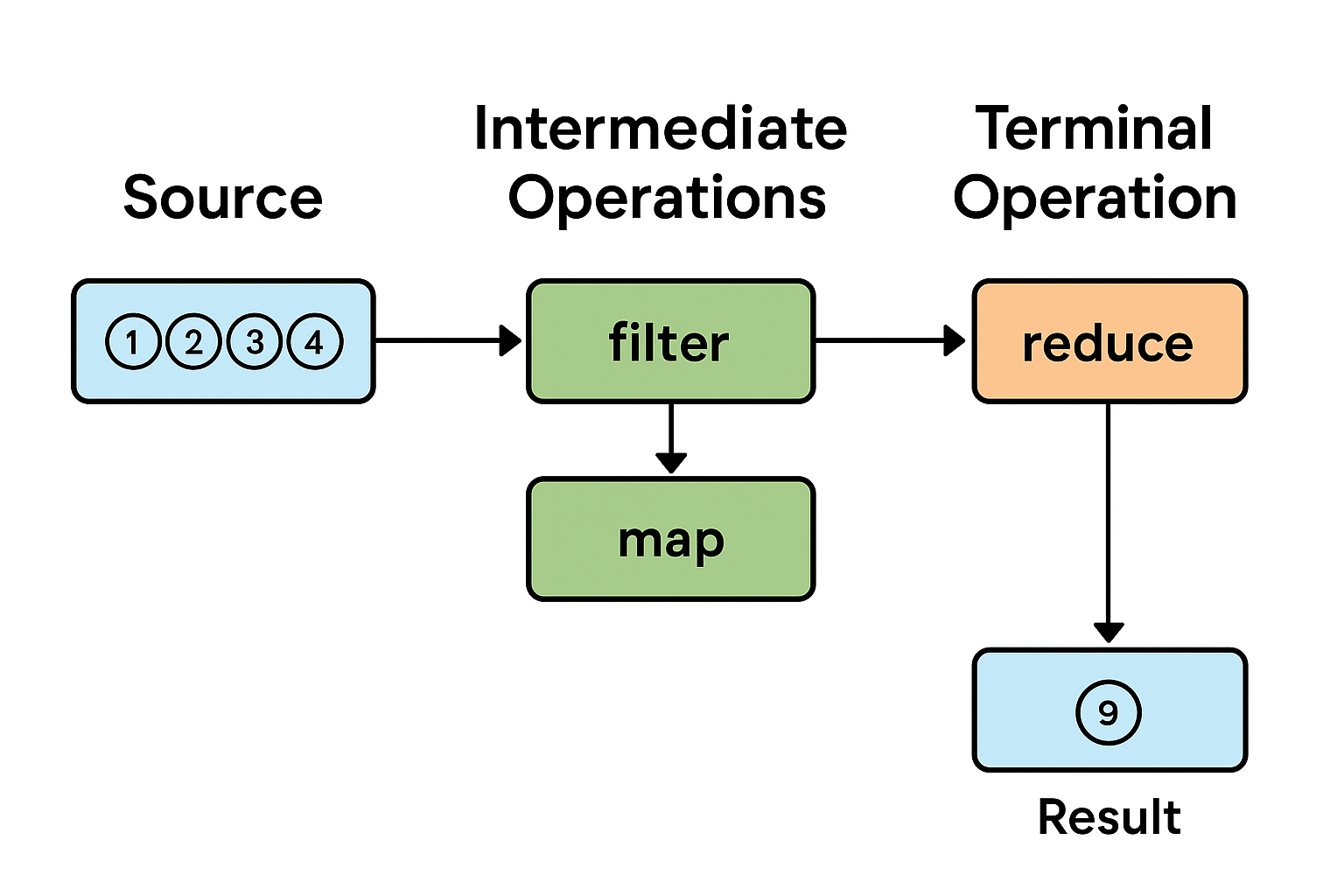
A Stream pipeline always has three stages:
3.1 Source (Starting Point)
The source provides the data for processing.
Common Stream sources:
collection.stream()
Stream.of(1, 2, 3)
Arrays.stream(array)
Files.lines(path)
Anything that implements java.util.stream.BaseStream can act as a source.
3.2 Intermediate Operations (Lazy)
Intermediate operations build the pipeline but do not execute immediately.
These operations return a new Stream and are lazy, meaning nothing happens until later.
Common intermediate operations:
| Operation | Type | Description |
|---|---|---|
filter() | Stateless | Keeps elements matching a condition |
map() | Stateless | Transforms each element |
flatMap() | Stateless | Converts nested structures into flat streams |
sorted() | Stateful | Sorts based on comparator |
distinct() | Stateful | Removes duplicates |
limit() | Stateful (Short-circuit) | Stops after a number of elements |
Example:
stream.filter(n -> n > 10)
      .map(n -> n * 2);
Still no processing happens yet — Streams are lazy.
3.3 Terminal Operations (Execution Phase)
Only a terminal operation triggers execution of the pipeline.
Common terminal operations:
forEach(...)
collect(...)
reduce(...)
count()
findFirst()
findAny()
anyMatch(...)
allMatch(...)
noneMatch(...)
Example:
List<Integer> result =
    numbers.stream()
           .filter(n -> n % 2 == 0)
           .map(n -> n * 10)
           .toList(); // Terminal — execution happens here
4. Lazy Evaluation in Streams
Lazy evaluation is one of the most powerful and misunderstood aspects of the Java Streams API. It affects performance, execution order, and how your code behaves internally.
A Stream pipeline is not executed immediately. Instead:
- Intermediate operations build a recipe
- Terminal operations trigger execution
- Elements are processed one-by-one, not stage-by-stage
- The pipeline evaluates just enough to produce results
This leads to massive performance benefits in filtering, mapping, short-circuiting, and large data processing.
4.1 What Does Lazy Evaluation Actually Mean?
When you write:
numbers.stream()
       .filter(n -> n > 10)
       .map(n -> n * 2)
Nothing happens yet.
Java simply records:
- A filter operation
- A map operation
The work happens only when you call a terminal operation:
.toList(); // or forEach(), collect(), reduce(), etc.
4.2 How Streams Process Elements (Per-Element Model)
Developers often think Streams process like this:
WRONG mental model (batch mode):
- Run filter on all elements
- Then run map on all filtered elements
- Then run terminal op on all mapped elements
But Streams actually work like this:
CORRECT mental model (per-element):
take element 1 → filter → map → terminal
take element 2 → filter → map → terminal
take element 3 → filter → map → terminal
...
This is why Streams can short-circuit effectively.
4.3 Lazy Evaluation Example
Code:
List<Integer> numbers = List.of(1, 2, 3, 4);

numbers.stream()
       .filter(n -> {
           System.out.println("Filtering " + n);
           return n % 2 == 0;
       })
       .map(n -> {
           System.out.println("Mapping " + n);
           return n * 10;
       })
       .forEach(System.out::println);
Output:
Filtering 1
Filtering 2
Mapping 2
20
Filtering 3
Filtering 4
Mapping 4
40
What this shows:
- Filtering happens one element at a time
- As soon as filter passes, map executes immediately
- No intermediate collections are created
- Streams optimize by not doing unnecessary work
4.4 Benefits of Lazy Evaluation
✔ More Efficient
Processes only what is needed.
✔ Enables Short-Circuiting
Operations like:
findFirst()anyMatch()limit()
Stop processing early.
✔ Supports Infinite Streams
Streams like:
Stream.generate(Math::random)
work only because evaluation is lazy.
✔ Improved Memory Use
No intermediate lists or arrays.
5. Short-Circuiting Operations
Short-circuiting is when a stream terminal or intermediate operation stops early once a condition is met.
This is a core performance feature in Streams.
5.1 Short-Circuiting Intermediate Operations
✔ limit(n)
Stops after processing n elements.
numbers.stream()
       .filter(n -> n > 10)
       .limit(2)
       .toList();
Even if the list has 10,000 elements, processing stops after 2 matches.
5.2 Short-Circuiting Terminal Operations
✔ anyMatch()
names.stream()
     .anyMatch(n -> n.startsWith("A"));
Stops at the first match.
✔ findFirst() / findAny()
Stream.of("A", "B", "C")
      .findFirst()
      .get();
Processes only the first element.
Why This Matters
Short-circuiting combined with lazy evaluation allows Streams to:
- Run faster
- Use less CPU
- Use less memory
- Avoid unnecessary iterations
This is one of the biggest advantages over imperative loops.
6. Stateful vs Stateless Operations
Streams have two types of intermediate operations.
6.1 Stateless Operations
These do not depend on other elements:
map()filter()flatMap()
They process each element independently.
Benefits:
- Fast
- Parallelizable
- Predictable
6.2 Stateful Operations
These must examine or buffer multiple elements:
sorted()distinct()limit()(partially stateful)skip()
Example:
numbers.stream().sorted().toList();
Sorting requires examining all elements before producing output.
Downsides:
- Slower
- Higher memory usage
- Not ideal for huge unbounded streams
- Sometimes inefficient in parallel streams
7. Common Stream Patterns
Streams shine when expressing common data-processing tasks in a fluent, readable pipeline. Here are the most widely used patterns every Java developer should know.
7.1 Filtering Elements
Use filter() to keep only elements that match a condition.
List<String> result =
    names.stream()
         .filter(n -> n.startsWith("A"))
         .toList();
7.2 Transforming Values with map()
map() transforms one value into another.
List<Integer> lengths =
    names.stream()
         .map(String::length)
         .toList();
7.3 Flattening Nested Structures with flatMap()
When each element contains a collection, use flatMap() to flatten them.
List<String> allWords =
    books.stream()
         .flatMap(book -> book.getWords().stream())
         .toList();
7.4 Collecting Results
Use collect() or .toList(), .toSet() in Java 16+.
List<String> sorted =
    names.stream()
         .sorted()
         .toList();
7.5 Reducing Values
reduce() combines elements to produce a single result.
int sum =
    numbers.stream()
           .reduce(0, Integer::sum);
7.6 Grouping and Partitioning (Powerful Collectors)
Grouping:
Map<Integer, List<String>> byLength =
    names.stream()
         .collect(Collectors.groupingBy(String::length));
Partitioning:
Map<Boolean, List<Integer>> evenOdd =
    numbers.stream()
           .collect(Collectors.partitioningBy(n -> n % 2 == 0));
8. Parallel Streams
Parallel Streams allow operations to be performed concurrently using the common ForkJoinPool.
8.1 What Are Parallel Streams?
Just add .parallel():
numbers.parallelStream()
       .map(n -> n * 2)
       .toList();
Java splits the stream into chunks and processes them on multiple threads.
8.2 When Parallel Streams Are Useful
Use them for:
- CPU-intensive operations
- Large data sets
- Pure functions (no shared state)
- Order-insensitive processing
Example:
long count =
    LongStream.range(1, 1_000_000)
              .parallel()
              .filter(n -> n % 2 == 0)
              .count();
8.3 When NOT to Use Parallel Streams
Avoid them if:
- Your operations mutate shared state
- You’re working with I/O operations
- Order matters
- Data sets are small
- You’re running inside application servers with managed thread pools
- They hurt readability more than they help
Parallelism is powerful but not free — use it wisely.
9. Common Mistakes Developers Make with Streams
Streams make code elegant — but they also introduce pitfalls. Avoid these common mistakes:
9.1 Modifying External State in a Stream
Bad:
List<Integer> result = new ArrayList<>();

numbers.stream()
       .map(n -> n * 2)
       .forEach(result::add);  // mutating external state!
This breaks functional purity and can cause issues in parallel streams.
Correct:
List<Integer> result =
    numbers.stream()
           .map(n -> n * 2)
           .toList();
9.2 Forgetting the Terminal Operation
Streams don’t run unless you trigger a terminal op.
numbers.stream().filter(n -> n > 10); // does nothing
9.3 Using Streams When a Simple Loop Is Cleaner
Streams are great, but not for everything.
Bad:
IntStream.range(0, list.size()).forEach(i -> ... );
Good:
for (int i = 0; i < list.size(); i++) { ... }
9.4 Using Parallel Streams Incorrectly
Common mistakes:
- Doing I/O in parallel streams
- Relying on shared mutable state
- Expecting parallelization to always be faster
- Using parallel streams inside web servers (bad idea)
9.5 Creating Too Many Intermediate Streams
Bad:
list.stream().map(...).stream().filter(...); // redundant
9.6 Overusing Streams
If your code becomes harder to read, prefer loops.
10. Best Practices for Using Streams
✔ Keep pipelines readable
Break long pipelines into multiple lines.
✔ Prefer method references
names.stream().map(String::toUpperCase)
Cleaner than:
names.stream().map(n -> n.toUpperCase())
✔ Avoid shared mutable state
Pure functions are safe; mutation is dangerous.
✔ Use Collectors effectively
Collectors simplify grouping, mapping, joining, and reducing.
Example:
Map<Integer, Long> countByLength =
    names.stream()
         .collect(Collectors.groupingBy(String::length, Collectors.counting()));
✔ Use sequential streams unless parallel provides measurable improvement
Parallel should always be a conscious choice.
11. Summary
Streams offer a powerful way to process collections using functional patterns.
Key ideas to remember:
- Streams work in pipelines: source → intermediate → terminal
- Intermediate operations are lazy
- Terminal operations trigger execution
- Streams process one element at a time
- Short-circuit operations improve performance
- Stateful operations require extra memory
- Parallel streams can help — but only in the right situations
- Follow best practices to avoid pitfalls
- Parallel streams are not always the right choice for concurrency; for fine-grained control over thread management, task scheduling, and resource usage, see ExecutorService and thread pools in Java — when parallel streams are not enough .
Mastering Streams gives you cleaner code, fewer bugs, and stronger interview performance.
TL;DR
The Java Streams API enables functional, lazy, pipeline-based processing of collections using source, intermediate, and terminal operations. Streams improve readability, performance, and correctness when used properly.
View Full Source Code on GitHub
Master Lambda Expressions, Functional Interfaces & Optional in Java 8
What is the Java Streams API in simple terms?
The Java Streams API provides a functional, pipeline-based way to process collections of data.
Instead of writing loops, you define what should happen to the data using operations like filter, map, and collect. Streams focus on declarative data processing, not data storage.
What is a stream pipeline?
A stream pipeline consists of three parts:
Source – where data comes from (collection, array, I/O)
Intermediate operations – transformations like filter, map, sorted
Terminal operation – triggers execution (forEach, collect, reduce)
Until a terminal operation is called, nothing executes.
Why are Java streams lazily evaluated?
Streams are lazy to improve performance and efficiency.
Lazy evaluation means:
Operations execute only when needed
Processing stops as soon as the result is determined
Intermediate results are not stored
This allows optimizations like short-circuiting and element-by-element processing.
Can Java streams modify the original collection?
No.
Streams are immutable views of data.
The source collection is never modified
Each operation produces a new stream
Side effects are discouraged
This design makes streams safer and easier to reason about.
Why can a stream be consumed only once?
Streams represent a single-use computation pipeline.
Once a terminal operation executes:
The stream is closed
The internal state is consumed
Reusing it would be unsafe
If you need to process data again, create a new stream from the source.
What is the difference between map() and flatMap()?
map() transforms each element into exactly one elementflatMap() transforms each element into zero or more elements and flattens the result
Example use case for flatMap():
Processing nested collections
Splitting strings into words
Merging multiple streams into one
When should parallel streams be avoided?
Parallel streams should be avoided when:
Tasks involve blocking I/O
Execution order matters
Workload is small
You need custom thread management
You run inside application servers or shared environments
For controlled concurrency, prefer ExecutorService and thread pools.
Are parallel streams faster than sequential streams?
Not always.
Parallel streams may be slower when:
Overhead of thread coordination outweighs work
Data size is small
CPU cores are limited
Tasks are not CPU-bound
Always benchmark before assuming performance gains.
Are Java streams suitable for production systems?
Yes — when used correctly.
Best practices:
Keep stream operations side-effect free
Avoid heavy logic inside lambdas
Use sequential streams by default
Profile before using parallel streams
Misuse often causes more problems than streams themselves.
Are Java streams the same as reactive streams?
No.
Java Streams are synchronous and pull-based
Reactive streams are asynchronous and push-based
Streams are for in-memory data processing, not event streams or async pipelines.
What is the difference between streams and loops?
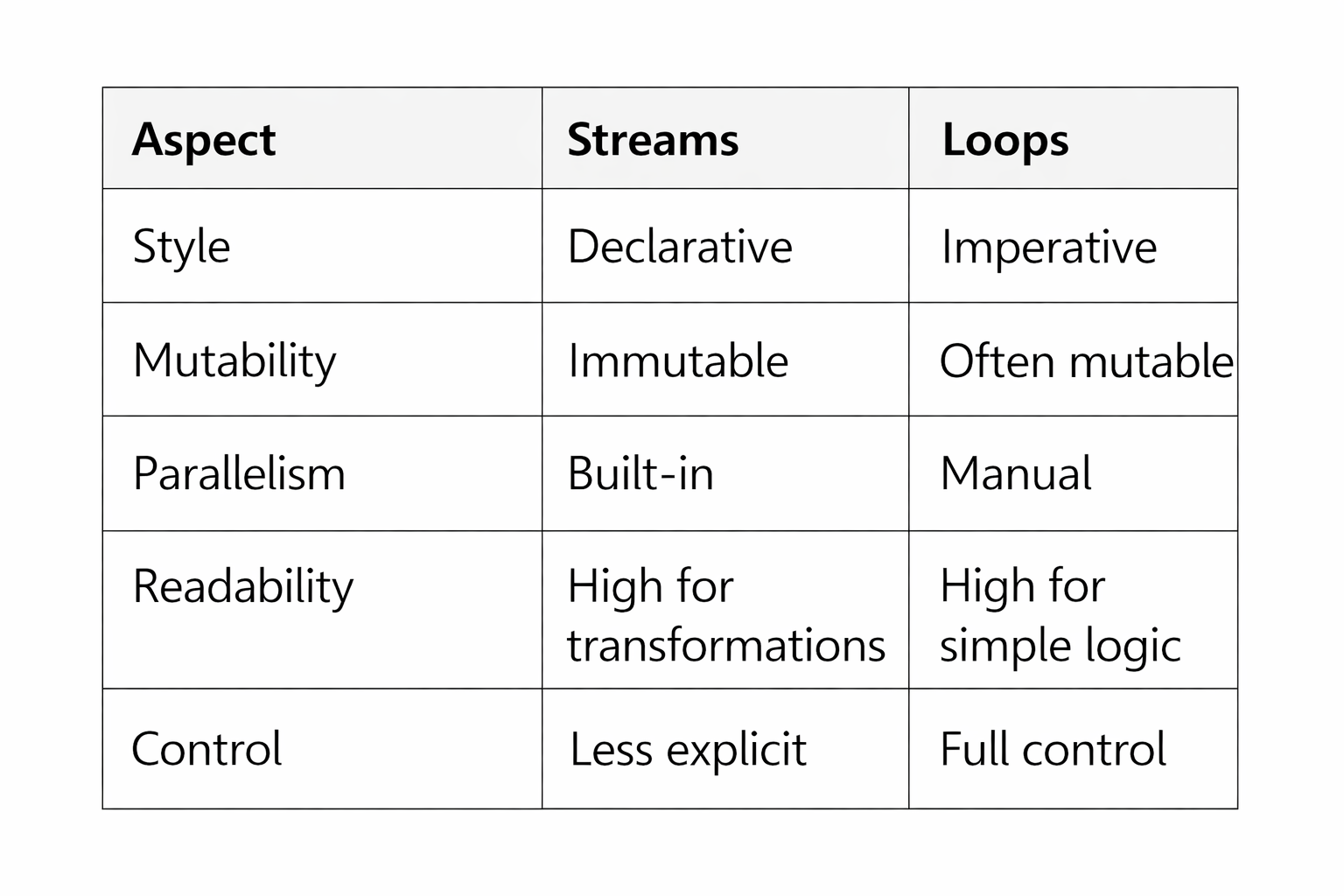
Streams excel at data transformation, loops excel at complex control flow.
12. References & Further Reading
- Oracle Java Streams Tutorial
https://docs.oracle.com/javase/8/docs/api/java/util/stream/package-summary.html - Java Language Specification (Streams)
https://docs.oracle.com/javase/specs/ - Effective Java (3rd Edition) — Joshua Bloch
Item 48: “Use Streams Judiciously” - Official Collectors Documentation
https://docs.oracle.com/javase/8/docs/api/java/util/stream/Collectors.html
Did this tutorial help you?
If you found this useful, consider bookmarking Code & Candles or sharing it with a friend.
Explore more tutorials